
Corporate Send Money
One of the primary use cases of the IC API is to facilitate corporate salary disbursements, enabling sending partners to process individual salary payments on behalf of corporate customers. This allows corporates to pay employees quickly, securely, and across multiple payout corridors using IC’s infrastructure.
Best integration practices
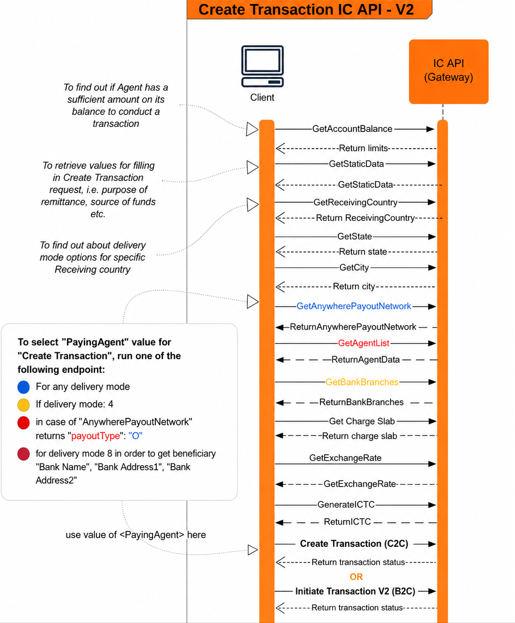
The sequence diagram is for your reference but we recommend that you follow the best practices below when integrating with the IC API:
- Cache static data and reuse
- Asynchronous processing to enhance page loads
- Optimize codes and queries to improve processing time and performance
Authenticating your request
Before sending a money transfer request, you'll need to authenticate your request using your API key and other required headers. The IC API uses Basic Authentication, so you'll need to include your API key in the Authorization header of your request. In addition, you may need to include other custom headers, such as the subscription key and financial API headers, depending on the endpoint you're using. Consult the API Reference for more information on required headers and authentication methods.
Initiating a Salary Payment (V2)
Before sending a transaction, you need to generate a unique Instant Cash Transaction Code (ICTC) reference number for your transaction.
To do this, call the /transactions/generate-ictc endpoint and use the ICTC number returned in the response.
Once authenticated and the ICTC is generated, salary transactions can be initiated using the V2 endpoint:
POST /api/v2/transactions/initiate
This endpoint supports both B2C (salary payments) and C2C (peer transfers) under a unified API framework.
Once you've included these parameters in your request, submit the request to the API using the appropriate HTTP method (typically POST). The API will process the request and respond with a confirmation or an error message, depending on the result of the transfer.
For a detailed example of how to create a transaction and send money, see our recipe.
Checking the Status of a Transfer
After submitting a money transfer request, you can check the status of the transfer by calling the transactions/details endpoint. This endpoint allows you to retrieve information about a specific transfer, including its status, transaction ID, and other details. To call this endpoint, you'll need to include the transaction reference as a parameter in your request.
Once you've submitted the request, the API will respond with information about the status of the transfer. You can use this information to update your application's user interface and provide feedback to your customers about the progress of their transfer.
Error handling
As with any API integration, there may be errors or edge cases that occur during the money transfer process. To handle these errors gracefully, be sure to implement error handling and retry mechanisms in your application.
In addition, be sure to review the API Reference for guidance on error codes and messages that may be returned by the API and use this information to provide informative error messages to your customers.
Summary
The B2C salary payment flow follows the same technical workflow as C2C transfers, with V2 enabling a unified, scalable, and high-performance transaction model for both use cases.
Updated 3 months ago